Tree Converter v 1.0

0/5,
0
votes
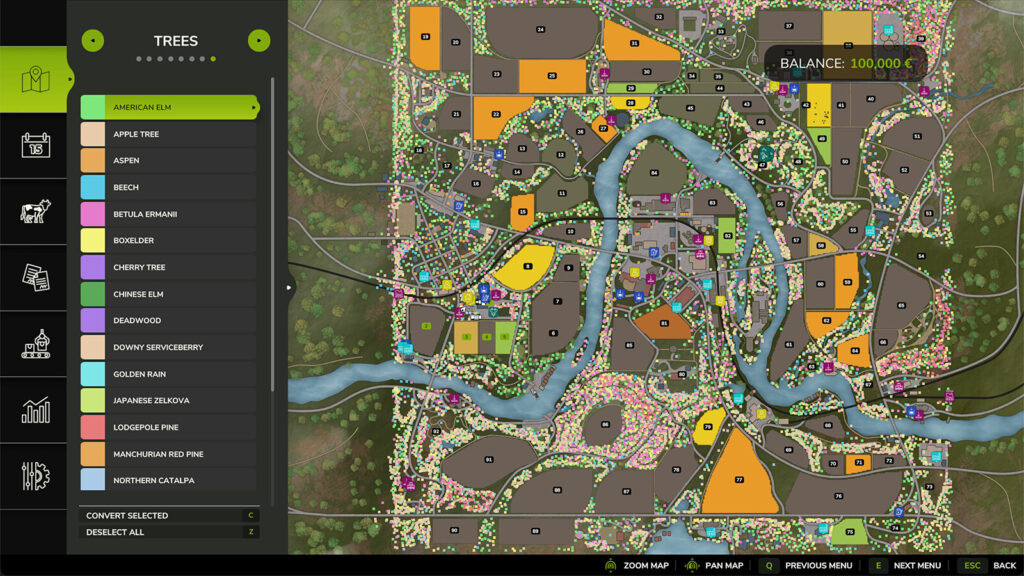
For appropriate forestry management, it transforms static map trees into planted trees. Converted trees are stored in your savegame and, if they haven't reached maturity yet, may still develop.
Use: Launch the in-game map and choose "Trees" from the drop-down menu. After choosing tree kinds from the filter list, click “Convert Selected”.
The console commands tcConvert, tcConvertRadius, tcConvertAll, tcConvertSelected, and tcCount
Paint-a-Farm | Kim Brandwijk is credited.
Use: Launch the in-game map and choose "Trees" from the drop-down menu. After choosing tree kinds from the filter list, click “Convert Selected”.
The console commands tcConvert, tcConvertRadius, tcConvertAll, tcConvertSelected, and tcCount
Paint-a-Farm | Kim Brandwijk is credited.
Download Latest Version Files
Version: v 1.0Updated: 10 months ago
Total Size: 102.48 KB FS25_TreeConverter_fs25planet.zip direct download · 102.48 KB · added 10 months ago
You Might Also Like »


_fs25planet.jpg)

0 Comments
There are no comments. Be first to comment!