Screenshot Mode v 1.0.1

0/5,
0
votes
Latest Update
latest
Version
v 1.0.1
10 months ago
Use the Screenshot Mode to improve your in-game screenshots!
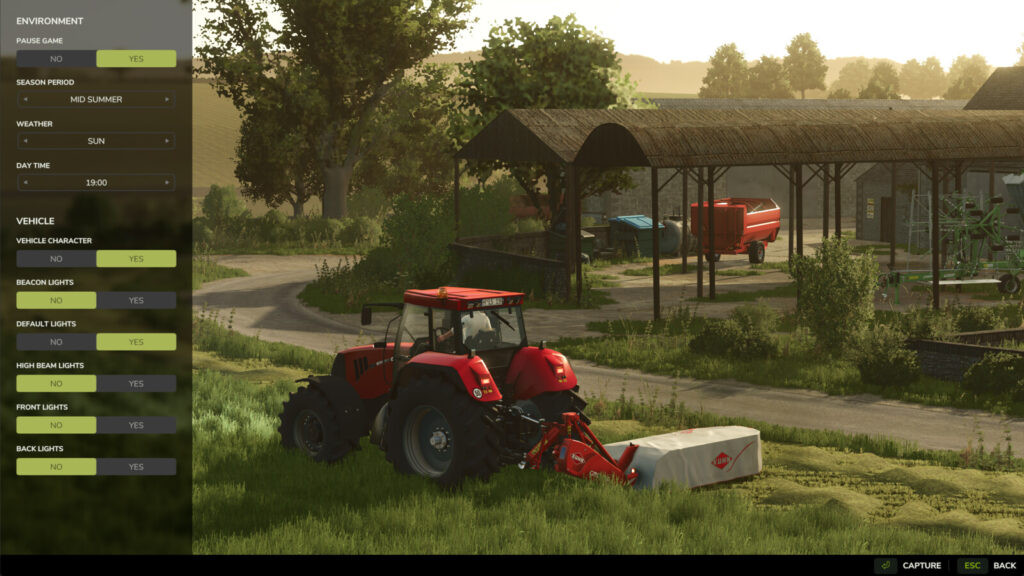
With this mod, you may freely manipulate the camera, change the environment (time, weather, season), configure the controlled vehicle, and more to produce beautiful images.
Overview of features:
You can freely move and rotate the camera, change the field of view (FOV), choose a season, set the weather (rain, hail, cloudy, or sunny), choose the time of day, pause or unpause the game, adjust vehicle lights and character visibility, and play multiplayer!
The controls are simple to use and straightforward, drawing inspiration from Euro Truck Simulator 2 Photo Mode.
Controls:
– Open Screenshot Mode: Alt + j
– Move: W-A-S-D (Qwerty, Qwertz) / Z-Q-S-D (Azerty)
– Fly: Q-E (Qwerty, Qwertz) / A-E (Azerty)
– Rotate: Z-C (Qwerty) / W-C (Azerty) / Y-C (Qwertz) / Left mouse click
– Adjust FOV: Mouse Wheel
– Reset FOV: Mouse wheel click
– Change camera speed / FOV zoom speed: Left Ctrl / Shift
Changelog: +
Changelog 1.0.0.1: – Repaired hail that appeared when the Shop or Esc menus were opened
Thanks to Monsieur Bab
With this mod, you may freely manipulate the camera, change the environment (time, weather, season), configure the controlled vehicle, and more to produce beautiful images.
Overview of features:
You can freely move and rotate the camera, change the field of view (FOV), choose a season, set the weather (rain, hail, cloudy, or sunny), choose the time of day, pause or unpause the game, adjust vehicle lights and character visibility, and play multiplayer!
The controls are simple to use and straightforward, drawing inspiration from Euro Truck Simulator 2 Photo Mode.
Controls:
– Open Screenshot Mode: Alt + j
– Move: W-A-S-D (Qwerty, Qwertz) / Z-Q-S-D (Azerty)
– Fly: Q-E (Qwerty, Qwertz) / A-E (Azerty)
– Rotate: Z-C (Qwerty) / W-C (Azerty) / Y-C (Qwertz) / Left mouse click
– Adjust FOV: Mouse Wheel
– Reset FOV: Mouse wheel click
– Change camera speed / FOV zoom speed: Left Ctrl / Shift
Changelog: +
Changelog 1.0.0.1: – Repaired hail that appeared when the Shop or Esc menus were opened
Thanks to Monsieur Bab
Use the Screenshot Mode to improve your in-game screenshots!
With the help of this mod, you can freely manipulate the camera, change the environment (time, weather, and season), configure the controlled vehicle, and more to produce breathtaking images.
Overview of features:
You can freely move and rotate the camera, change the field of view (FOV), choose a season, set the weather (rain, hail, cloudy, or sunny), choose the time of day, pause or unpause the game, adjust vehicle lights and character visibility, and play multiplayer!
The controls are simple to use and straightforward, drawing inspiration from Euro Truck Simulator 2 Photo Mode.
Controls:
– Open Screenshot Mode: Alt + j
– Move: W-A-S-D (Qwerty, Qwertz) / Z-Q-S-D (Azerty)
– Fly: Q-E (Qwerty, Qwertz) / A-E (Azerty)
– Rotate: Z-C (Qwerty) / W-C (Azerty) / Y-C (Qwertz) / Left mouse click
– Adjust FOV: Mouse Wheel
– Reset FOV: Mouse wheel click
– Change camera speed / FOV zoom speed: Left Ctrl / Shift
Thanks to Monsieur Bab
With the help of this mod, you can freely manipulate the camera, change the environment (time, weather, and season), configure the controlled vehicle, and more to produce breathtaking images.
Overview of features:
You can freely move and rotate the camera, change the field of view (FOV), choose a season, set the weather (rain, hail, cloudy, or sunny), choose the time of day, pause or unpause the game, adjust vehicle lights and character visibility, and play multiplayer!
The controls are simple to use and straightforward, drawing inspiration from Euro Truck Simulator 2 Photo Mode.
Controls:
– Open Screenshot Mode: Alt + j
– Move: W-A-S-D (Qwerty, Qwertz) / Z-Q-S-D (Azerty)
– Fly: Q-E (Qwerty, Qwertz) / A-E (Azerty)
– Rotate: Z-C (Qwerty) / W-C (Azerty) / Y-C (Qwertz) / Left mouse click
– Adjust FOV: Mouse Wheel
– Reset FOV: Mouse wheel click
– Change camera speed / FOV zoom speed: Left Ctrl / Shift
Thanks to Monsieur Bab
Download Latest Version Files
Version: v 1.0.1Updated: 10 months ago
Total Size: 104.33 KB FS25_ScreenshotMode_fs25planet.zip direct download · 104.33 KB · added 10 months ago
You Might Also Like »

_fs25planet.webp)
0 Comments
There are no comments. Be first to comment!