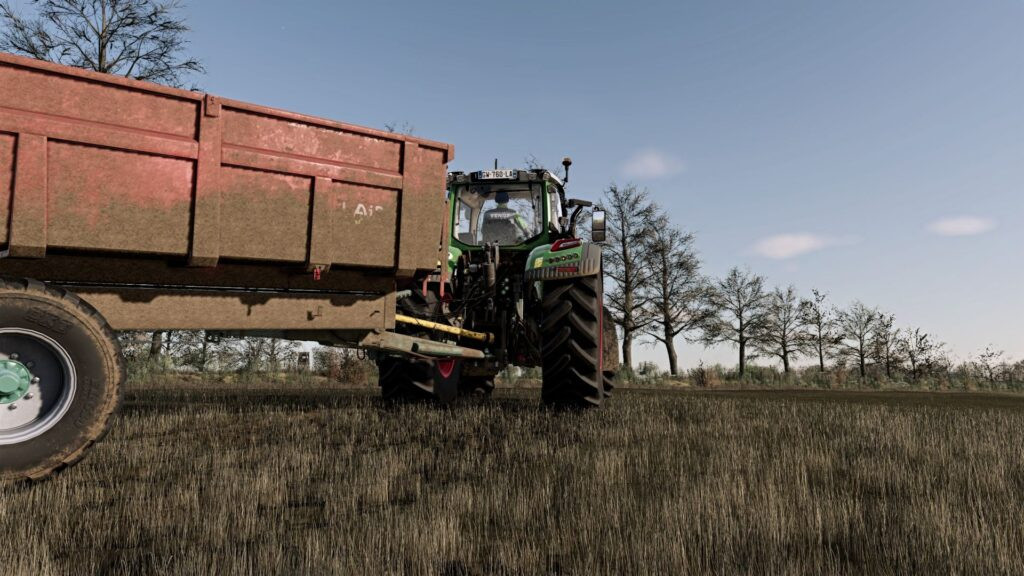
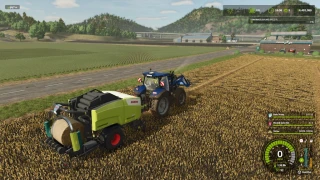
Realistic day/night shader v 1.7

0/5,
0
votes
Latest Update
latest
Version
v 1.7
8 months ago
My shader adjustment for Reshadme 6.5.1 compatible HDR screen
Installation: copy the franckylem35 folder to Documents\My Games\FarmingSimulator2025\modSettings\FS25_additionalGameSettings\lighting
Copy the Franckylem35.ini file to Farming simulator 25\x64
Changelog: +
V1.7.0.0
Environment Setting
V1.6.0.0
Coloring and contrast adjustments
V1.5.0.0
Adjustment of the day/night cycle to have less interruption when switching from one to the other.
several adjustments have been made to have a more realistic and natural effect.
V1.4.0.0
Adding a filter to make the image less video games
V1.3.0.0
Increased contrast and decreased night colors for a more realistic effect.
Set game brightness to 0.7
V1.2.0.0
Increased contrasts, adjusted lighting to make it more realistic.
V1.1.0.0
Increased contrast and adjusted lighting.
Set game brightness to 0.5
Credits:
franckylem35
Installation: copy the franckylem35 folder to Documents\My Games\FarmingSimulator2025\modSettings\FS25_additionalGameSettings\lighting
Copy the Franckylem35.ini file to Farming simulator 25\x64
Changelog: +
V1.7.0.0
Environment Setting
V1.6.0.0
Coloring and contrast adjustments
V1.5.0.0
Adjustment of the day/night cycle to have less interruption when switching from one to the other.
several adjustments have been made to have a more realistic and natural effect.
V1.4.0.0
Adding a filter to make the image less video games
V1.3.0.0
Increased contrast and decreased night colors for a more realistic effect.
Set game brightness to 0.7
V1.2.0.0
Increased contrasts, adjusted lighting to make it more realistic.
V1.1.0.0
Increased contrast and adjusted lighting.
Set game brightness to 0.5
Credits:
franckylem35
My shader modification for an HDR screen compatible with Reshadme 6.5.1
Setting up: Under Documents\My Games\FarmingSimulator2025\modSettings\FS25_additionalGameSettings\lighting, transfer the franckylem35 folder.
Transfer the Franckylem35.ini file to the 25x64 Farming Simulator.
Source: franckylem35
Setting up: Under Documents\My Games\FarmingSimulator2025\modSettings\FS25_additionalGameSettings\lighting, transfer the franckylem35 folder.
Transfer the Franckylem35.ini file to the 25x64 Farming Simulator.
Source: franckylem35
Download Latest Version Files
Version: v 1.7Updated: 8 months ago
Total Size: 22.46 KB Reel-shader_fs25planet.rar direct download · 22.46 KB · added 8 months ago
You Might Also Like »

_fs25planet.webp)
0 Comments
There are no comments. Be first to comment!