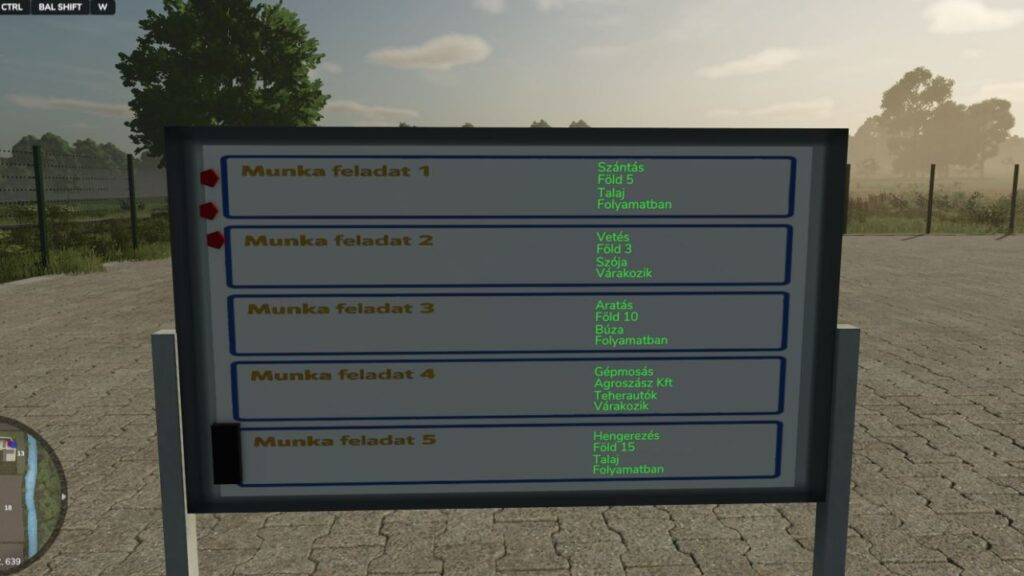
Farm Task Manager Display v 1.0

0/5,
0
votes
Are you trying to find a professional approach to oversee operations on your multiplayer farm or dedicated server? For your farm office, this mod adds a placeable Task Manager Display. Even when the administrator is not online, it enables farm managers to effectively assign tasks, monitor progress, and interact with the team!
Work Type, Owner/Field, Crop, and Status are the four movable categories found in each of the five distinct Task Boxes on the display.
Important Features:
Ready Dedicated Server: Completely synchronized! The task data is durable since save games are externally saved (box.xml).
Late-Join Sync: The changed tasks are instantly visible to players that join the server later. The administrator doesn't have to be online to "tell" people what to do.
Smart Visibility: When a player approaches the board, a trigger causes the display text to automatically activate, emulating an office setting.
Multilingual Support: Completely translated into Hungarian, German, French, and English.
Keyboard controls: To engage the controls, approach the display:
To cycle between the four categories (Work type -> Owner -> Crop -> Status), use CTRL + SHIFT + W.
CTRL + SHIFT + E: Step ahead to the next value.
CTRL + SHIFT + Q: Go back to the previous value.
Ideal for big farming teams and role-playing (RP) servers!
Honved4 is credited.
Work Type, Owner/Field, Crop, and Status are the four movable categories found in each of the five distinct Task Boxes on the display.
Important Features:
Ready Dedicated Server: Completely synchronized! The task data is durable since save games are externally saved (box.xml).
Late-Join Sync: The changed tasks are instantly visible to players that join the server later. The administrator doesn't have to be online to "tell" people what to do.
Smart Visibility: When a player approaches the board, a trigger causes the display text to automatically activate, emulating an office setting.
Multilingual Support: Completely translated into Hungarian, German, French, and English.
Keyboard controls: To engage the controls, approach the display:
To cycle between the four categories (Work type -> Owner -> Crop -> Status), use CTRL + SHIFT + W.
CTRL + SHIFT + E: Step ahead to the next value.
CTRL + SHIFT + Q: Go back to the previous value.
Ideal for big farming teams and role-playing (RP) servers!
Honved4 is credited.
Download Latest Version Files
Version: v 1.0Updated: 9 months ago
Total Size: 299.19 KB FS25_Feladat_display_fs25planet.zip direct download · 299.19 KB · added 9 months ago
You Might Also Like »
_fs25planet.webp)

0 Comments
There are no comments. Be first to comment!