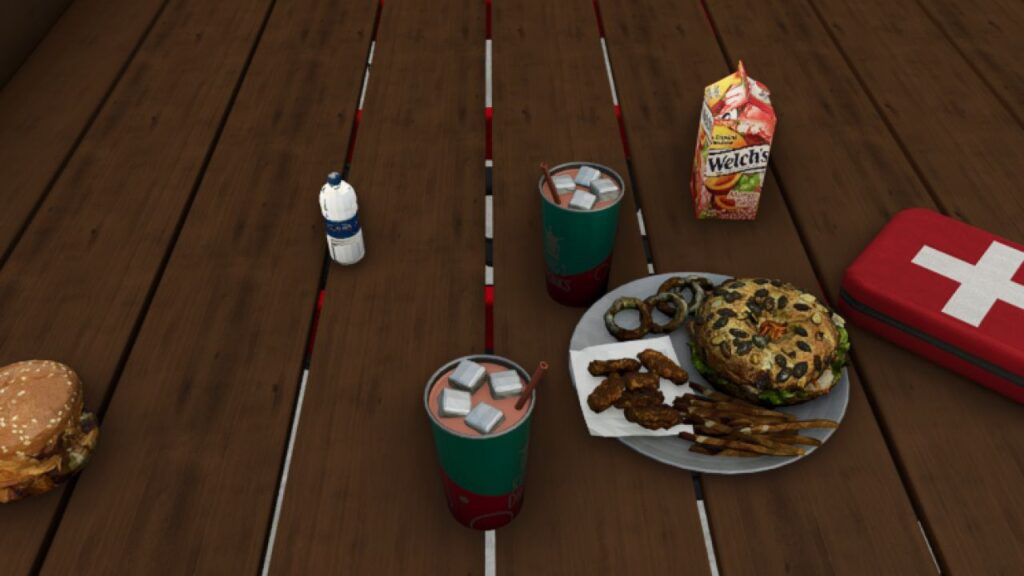
Life Mod v 1.0

0/5,
0
voti
Watch the video trailer for Phases 1 and 2! Thank you for your assistance, Zyzex. In addition, you may purchase a refrigerator in barns, set it up, and approach the door to replenish statistics.
Do you have a query? Do not be afraid to inquire!
Have a problem? To help me solve it, please provide your best example.
Prospective Roadmap
Phase 1: Completed Foundation
The three basic survival systems—health, hunger, and thirst—are finished.
Consumables inventory system - COMPLETED
Basic sanctions, cautions, and the process of recovery -FINISHED
Simplified graphics and placeholder icons -FINISHED
Phase 2: Global Interaction (Finished)
Put actual 3D food and drink things in lieu of the placeholder inventory symbols. -COMPLETED
Permit things to be:
Picked up and finished
Dropped -FINISHED
Finished and placed anyplace in the globe
Consume goods straight from the source (not simply inventories) -FINISHED
Phase 3: Immersion and Realism
Drinking and eating animations
Interactions depending on context (using the object in hand, from the ground, or from storage) -FINISHED Sound effects for status changes and consumption -FINISHED
Low-needs visual feedback (player posture, screen effects)
Phase 4: Personalization and Balance
Settings menu for the player or administrator:
Switching on survival systems – FINISHED
Modify the rates of depletion
Presets for difficulty (Casual to Hardcore)
Performance tweaking and compatibility with mods
Phase 5: Growth
Types of edible items
Systems for preparation or crafting
Player temperature systems or fatigue
AI or NPC engagement with survival mechanics
Tutorial Opening/Closing Inventory Controls Survival Inventory:
Toggle the inventory on/off by pressing I.
Fundamental Item Management:
To move or pick up objects in the grid, use the left mouse button.
utilize/consume an item (eat food, drink drinks, utilize health packs) by double-clicking
To move objects about the inventory grid, drag, drop, then click the item.
Drag Outside Grid – To drop an item into the game environment, drag it outside the inventory grid.
Fast Purchase Inventory (Hold Shift + Number) or Misc Category Items in-store:
Purchase Burger ($10) by Shifting + 1 – Purchase Soda Pop ($8) by Shifting + 2 –
Use Shift + 3 to purchase water ($10).
Shift + 4 & #8211; Purchase Juice ($15)
Move + 5 – Purchase a $50 meal
Shift + 6 – Purchase a $25 Health Pack
Advice: The grid sizes of the objects vary (1, 2, or 2). Hover your cursor on an item to see its value and statistics.
When the inventory is open, you are unable to move.
Thanks to Zyzex
Do you have a query? Do not be afraid to inquire!
Have a problem? To help me solve it, please provide your best example.
Prospective Roadmap
Phase 1: Completed Foundation
The three basic survival systems—health, hunger, and thirst—are finished.
Consumables inventory system - COMPLETED
Basic sanctions, cautions, and the process of recovery -FINISHED
Simplified graphics and placeholder icons -FINISHED
Phase 2: Global Interaction (Finished)
Put actual 3D food and drink things in lieu of the placeholder inventory symbols. -COMPLETED
Permit things to be:
Picked up and finished
Dropped -FINISHED
Finished and placed anyplace in the globe
Consume goods straight from the source (not simply inventories) -FINISHED
Phase 3: Immersion and Realism
Drinking and eating animations
Interactions depending on context (using the object in hand, from the ground, or from storage) -FINISHED Sound effects for status changes and consumption -FINISHED
Low-needs visual feedback (player posture, screen effects)
Phase 4: Personalization and Balance
Settings menu for the player or administrator:
Switching on survival systems – FINISHED
Modify the rates of depletion
Presets for difficulty (Casual to Hardcore)
Performance tweaking and compatibility with mods
Phase 5: Growth
Types of edible items
Systems for preparation or crafting
Player temperature systems or fatigue
AI or NPC engagement with survival mechanics
Tutorial Opening/Closing Inventory Controls Survival Inventory:
Toggle the inventory on/off by pressing I.
Fundamental Item Management:
To move or pick up objects in the grid, use the left mouse button.
utilize/consume an item (eat food, drink drinks, utilize health packs) by double-clicking
To move objects about the inventory grid, drag, drop, then click the item.
Drag Outside Grid – To drop an item into the game environment, drag it outside the inventory grid.
Fast Purchase Inventory (Hold Shift + Number) or Misc Category Items in-store:
Purchase Burger ($10) by Shifting + 1 – Purchase Soda Pop ($8) by Shifting + 2 –
Use Shift + 3 to purchase water ($10).
Shift + 4 & #8211; Purchase Juice ($15)
Move + 5 – Purchase a $50 meal
Shift + 6 – Purchase a $25 Health Pack
Advice: The grid sizes of the objects vary (1, 2, or 2). Hover your cursor on an item to see its value and statistics.
When the inventory is open, you are unable to move.
Thanks to Zyzex
Video

Scarica i file dell'ultima versione
Versione: v 1.0Aggiornato: 9 mesi fa
Dimensione totale: 274.41 MB FS25_food_fs25planet.zip direct scaricare · 274.41 MB · aggiunto 9 mesi fa
Ti potrebbe anche piacere »
_fs25planet.webp)
0 Commenti
Non ci sono commenti. Sii il primo a commentare!