Easy Development Controls v 1.2

0/5,
0
voti
Ultimo aggiornamento
ultimo
Versione
v 1.2
9 mesi fa

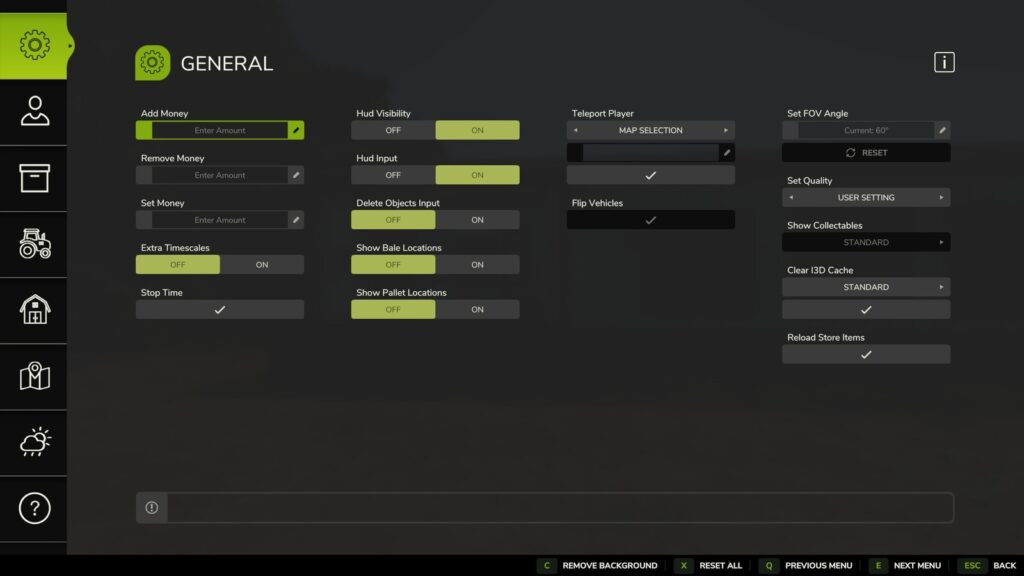
Modders, mappers, and content producers may use Easy Development Controls as a testing tool. Additionally, it might help with gameplay sets and how you want to play the game.
Along with the inclusion of several new custom capabilities, it has certain functions that were previously available via gaming console instructions but are now readily accessible.
The majority of functionality may be used in multiplayer, and several commands have adjustable permission levels. Existing terminal commands that were previously limited to the host are now included in this.
Among the characteristics of quality of life are:
Teleport: By choosing a spot on the map, either by field number or x/z coordinates, you may quickly move yourself or vehicles around it.
Flip Vehicles: This feature makes it simple for a user to adjust a vehicle's upright rotation.
Super Strength: Expands a player's pickup range and carrying capacity.
Hud Visibility: The whole hud may be shown or hidden, and a key binding can be enabled for quicker access.
All farm-owned bales will be shown on the map when you choose "Show Bale Locations."
To see all farm-owned pallets on the map, choose "Show Pallet Locations."
Advance development: Promotes all crops to the next stage of development.
There is something for everyone in Easy Development Controls thanks to its expanded feature set and other upcoming enhancements.
Inputs: – F12 to open the menu
Changelog: +
Changelog 1.2.0.0: The EDC Help page's "ABOUT" section now shows the current location of the "defaultUserSettings.xml."
– The ‘Open Menu’ key binding may now be used to dismiss the menu. If necessary, this functionality may be turned off in the
#8216;defaultUserSettings.xml
under
#8216;toggleMenuMode.
The following is included, along with a few basic enhancements and bug fixes.
– [Overall] Time may now be restarted thanks to the "Stop Time" feature. The play and pause icons are used to represent the time status on the button.
#8211 [General] In order to prevent any problems, the feature "Set Quality" now returns "User Default Settings" after leaving the game to the main menu.
#8211 [General] When "Show Bale Locations" is activated, fermenting bales in Object Storage structures are no longer visible.
[Objects] – When utilizing the "Remove Bales" option, fermenting bales in Object Storage buildings are no longer removed.
– [Objects] When there is no game limit, fermenting bales in Object Storage structures are not shown in the bales counter.
[Objects] – When use the 'Plant Tree' option on slopes, the proper ground height is now utilized.
When feasible, the Highlands Fishing Expansion log types are now supported via the [Objects] Feature "Add Log."
[Objects] – A discharge node is now included in box pallets for crops that were created using the 'Add Pallet' option. These pallets may be used at tip points.
[Automobiles] The "Vehicle Selection" function was added, which enables selection changes to be implemented when a vehicle is entered without exiting the menu. This tool is helpful when reloading several trailers, among other things.
[Automobiles] As requested, the "Wetness Debug" functionality was included.
[Permissions] – Pressing ESC or the back button, if necessary, now displays the Save Changes box.
Translations into Chinese Simplified (CS) have been added.
Translations into Italian (it) are updated.
The Spanish (es) translations have been updated.
Changelog 1.1.0.0: [General] A issue that caused certain POI icons to stay hidden after utilizing the teleport screen has been fixed.
#8211 [General] A issue that caused the option "Show Collectables" over 70% to appear wrongly when the menu was reopened has been fixed.
#8211 [General] Outdated help information for "Delete Objects Key" has been removed.
[Player] The "Super Strength" status may now be stored on dedicated servers thanks to a fixed erroneous configuration.
[Automobiles] Operating hours may now be specified to either 0 or 2 decimal digits.
[Vehicles] Resolved "Condition" that applied the chosen state type improperly.
Additionally, [Placeables] The "Tip To Trigger" text box has been fixed to not always enable or disable when the menu is opened.
Translations into Ukrainian (UK) have been added.
Translations into Brazilian Portuguese (br) have been updated.
Updated translations in Czech (cz).
French (fr) translations have been updated.
Translations into Polish and Polski (pl) have been updated.
Updated translations in German (de).
Translations into Russian (ru) have been updated.
Translations into Italian (it) are updated.
To minimize user confusion, several default user settings were changed to the "off" state and prevented from saving with the game.
Note: The defaultUserSettings.xml file will be adjusted to the new mod defaults due to mod modifications. These options may be changed to have them updated immediately when you join a multiplayer game or start a new local save, much as in earlier editions.
Version 1.0.0.0:
For certain languages, the wording of some new commands could appear in English. These will be changed in later releases as community members who are eager to help submit the accurate translations via GitHub.
Thanks to GtX
Along with the inclusion of several new custom capabilities, it has certain functions that were previously available via gaming console instructions but are now readily accessible.
The majority of functionality may be used in multiplayer, and several commands have adjustable permission levels. Existing terminal commands that were previously limited to the host are now included in this.
Among the characteristics of quality of life are:
Teleport: By choosing a spot on the map, either by field number or x/z coordinates, you may quickly move yourself or vehicles around it.
Flip Vehicles: This feature makes it simple for a user to adjust a vehicle's upright rotation.
Super Strength: Expands a player's pickup range and carrying capacity.
Hud Visibility: The whole hud may be shown or hidden, and a key binding can be enabled for quicker access.
All farm-owned bales will be shown on the map when you choose "Show Bale Locations."
To see all farm-owned pallets on the map, choose "Show Pallet Locations."
Advance development: Promotes all crops to the next stage of development.
There is something for everyone in Easy Development Controls thanks to its expanded feature set and other upcoming enhancements.
Inputs: – F12 to open the menu
Changelog: +
Changelog 1.2.0.0: The EDC Help page's "ABOUT" section now shows the current location of the "defaultUserSettings.xml."
– The ‘Open Menu’ key binding may now be used to dismiss the menu. If necessary, this functionality may be turned off in the
#8216;defaultUserSettings.xml
under
#8216;toggleMenuMode.
The following is included, along with a few basic enhancements and bug fixes.
– [Overall] Time may now be restarted thanks to the "Stop Time" feature. The play and pause icons are used to represent the time status on the button.
#8211 [General] In order to prevent any problems, the feature "Set Quality" now returns "User Default Settings" after leaving the game to the main menu.
#8211 [General] When "Show Bale Locations" is activated, fermenting bales in Object Storage structures are no longer visible.
[Objects] – When utilizing the "Remove Bales" option, fermenting bales in Object Storage buildings are no longer removed.
– [Objects] When there is no game limit, fermenting bales in Object Storage structures are not shown in the bales counter.
[Objects] – When use the 'Plant Tree' option on slopes, the proper ground height is now utilized.
When feasible, the Highlands Fishing Expansion log types are now supported via the [Objects] Feature "Add Log."
[Objects] – A discharge node is now included in box pallets for crops that were created using the 'Add Pallet' option. These pallets may be used at tip points.
[Automobiles] The "Vehicle Selection" function was added, which enables selection changes to be implemented when a vehicle is entered without exiting the menu. This tool is helpful when reloading several trailers, among other things.
[Automobiles] As requested, the "Wetness Debug" functionality was included.
[Permissions] – Pressing ESC or the back button, if necessary, now displays the Save Changes box.
Translations into Chinese Simplified (CS) have been added.
Translations into Italian (it) are updated.
The Spanish (es) translations have been updated.
Changelog 1.1.0.0: [General] A issue that caused certain POI icons to stay hidden after utilizing the teleport screen has been fixed.
#8211 [General] A issue that caused the option "Show Collectables" over 70% to appear wrongly when the menu was reopened has been fixed.
#8211 [General] Outdated help information for "Delete Objects Key" has been removed.
[Player] The "Super Strength" status may now be stored on dedicated servers thanks to a fixed erroneous configuration.
[Automobiles] Operating hours may now be specified to either 0 or 2 decimal digits.
[Vehicles] Resolved "Condition" that applied the chosen state type improperly.
Additionally, [Placeables] The "Tip To Trigger" text box has been fixed to not always enable or disable when the menu is opened.
Translations into Ukrainian (UK) have been added.
Translations into Brazilian Portuguese (br) have been updated.
Updated translations in Czech (cz).
French (fr) translations have been updated.
Translations into Polish and Polski (pl) have been updated.
Updated translations in German (de).
Translations into Russian (ru) have been updated.
Translations into Italian (it) are updated.
To minimize user confusion, several default user settings were changed to the "off" state and prevented from saving with the game.
Note: The defaultUserSettings.xml file will be adjusted to the new mod defaults due to mod modifications. These options may be changed to have them updated immediately when you join a multiplayer game or start a new local save, much as in earlier editions.
Version 1.0.0.0:
For certain languages, the wording of some new commands could appear in English. These will be changed in later releases as community members who are eager to help submit the accurate translations via GitHub.
Thanks to GtX
Modders, mappers, and content producers may use Easy Development Controls as a testing tool. Additionally, it may help you set up the game or play it the way you want.
Along with the inclusion of several new custom capabilities, it has certain functions that were previously available via gaming console instructions but are now readily accessible.
The majority of functions may be used in multiplayer mode, and certain commands have adjustable authorization levels. This now encompasses console instructions that were previously exclusive to the host.
Among the characteristics of quality of life are:
Teleport: By choosing a spot on the map, using the field number or x/z coordinates, you may quickly move yourself or vehicles around it.
Flip Vehicles: This feature makes it simple for a user to adjust a vehicle's upright rotation.
Super Strength: Expands a player's pickup range and carrying capacity.
Hud Visibility: Allows you to see and conceal the whole hud; for quicker access, you may also enable a key binding.
All farm-owned bales will be shown on the map when you choose "Show Bale Locations."
To see all farm-owned pallets on the map, choose "Show Pallet Locations."
Advance development: Promotes all crops to the next stage of development.
Easy Development Controls offers something for everyone with its expanded feature set and more upcoming additions.
Inputs: – F12 to open the menu
Changelog: 1.0.0.0 release: – For certain languages, the wording of some new commands may appear in English; they will be changed in later updates as community members who are eager to help submit the accurate translations via GitHub.
Thanks to GtX
Along with the inclusion of several new custom capabilities, it has certain functions that were previously available via gaming console instructions but are now readily accessible.
The majority of functions may be used in multiplayer mode, and certain commands have adjustable authorization levels. This now encompasses console instructions that were previously exclusive to the host.
Among the characteristics of quality of life are:
Teleport: By choosing a spot on the map, using the field number or x/z coordinates, you may quickly move yourself or vehicles around it.
Flip Vehicles: This feature makes it simple for a user to adjust a vehicle's upright rotation.
Super Strength: Expands a player's pickup range and carrying capacity.
Hud Visibility: Allows you to see and conceal the whole hud; for quicker access, you may also enable a key binding.
All farm-owned bales will be shown on the map when you choose "Show Bale Locations."
To see all farm-owned pallets on the map, choose "Show Pallet Locations."
Advance development: Promotes all crops to the next stage of development.
Easy Development Controls offers something for everyone with its expanded feature set and more upcoming additions.
Inputs: – F12 to open the menu
Changelog: 1.0.0.0 release: – For certain languages, the wording of some new commands may appear in English; they will be changed in later updates as community members who are eager to help submit the accurate translations via GitHub.
Thanks to GtX
Video

Scarica i file dell'ultima versione
Versione: v 1.2Aggiornato: 9 mesi fa
Dimensione totale: 449.08 KB FS25_EasyDevControls_fs25planet.zip direct scaricare · 449.08 KB · aggiunto 9 mesi fa
Ti potrebbe anche piacere »
_fs25planet.webp)
0 Commenti
Non ci sono commenti. Sii il primo a commentare!