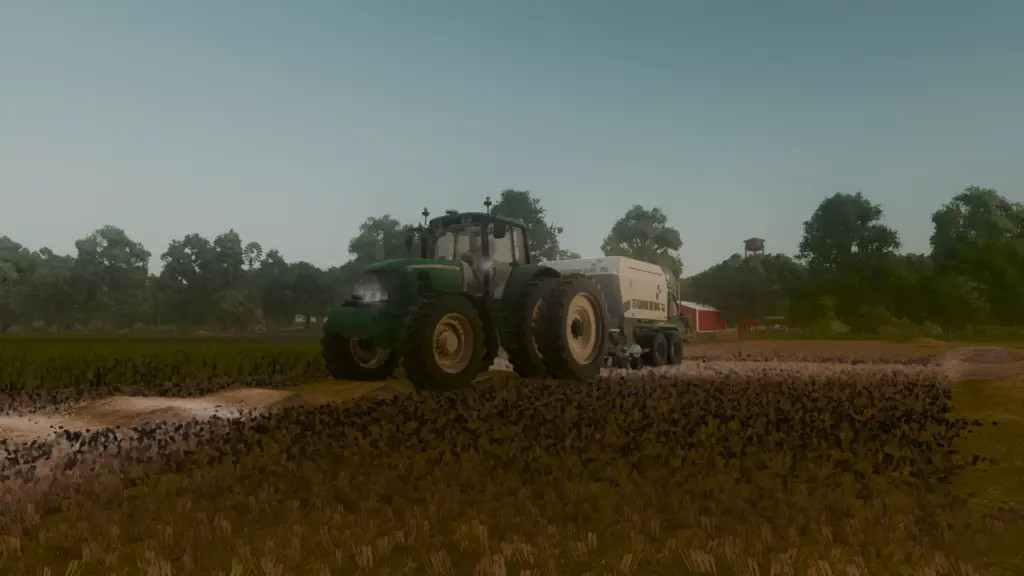
MFT Reshade v 1.0
0/5,
0
voti
I created shaders because I was bored.
Although I am aware that these are not the finest, I would say they are respectable for my first attempt at custom ReShade. M&H’'s ReShade provided me with the ground texture.
You must unpack the folder after downloading it; I've included a ReShade setup tool. You must launch ReShade by hitting "HOME" or whatever button you customized it to in order to add the shaders to your game. The shaders will then be automatically configured when you pick the.ini file at the top of the ReShade screen (I've included a picture). Just be sure to relocate the.ini to your desktop or downloads folder for convenient access.
Please let me know if there is anything I need modify about them; I'm not sure what I'm doing.
These shaders aren't stolen, sorry. I used one feature from M&Hs ReShade, the ground texture switcher, to create these myself.
Thanks to MFT Modding
Although I am aware that these are not the finest, I would say they are respectable for my first attempt at custom ReShade. M&H’'s ReShade provided me with the ground texture.
You must unpack the folder after downloading it; I've included a ReShade setup tool. You must launch ReShade by hitting "HOME" or whatever button you customized it to in order to add the shaders to your game. The shaders will then be automatically configured when you pick the.ini file at the top of the ReShade screen (I've included a picture). Just be sure to relocate the.ini to your desktop or downloads folder for convenient access.
Please let me know if there is anything I need modify about them; I'm not sure what I'm doing.
These shaders aren't stolen, sorry. I used one feature from M&Hs ReShade, the ground texture switcher, to create these myself.
Thanks to MFT Modding
Scarica i file dell'ultima versione
Versione: v 1.0Aggiornato: 11 mesi fa
Dimensione totale: 3.7 MB MFT-ReShade-EXTRACT_fs25planet.zip direct scaricare · 3.7 MB · aggiunto 11 mesi fa
Ti potrebbe anche piacere »
_fs25planet.jpg)
0 Commenti
Non ci sono commenti. Sii il primo a commentare!