New Grass Texture v 1.3
801
téléchargements
320.42 MB
taille des fichiers
0
commentaires
0
vidéos
2
mises à jour

par
admin
il y a 1 an
0/5,
0
votes
Dernière mise à jour
dernier site
Version
v 1.3
il y a 9 mois
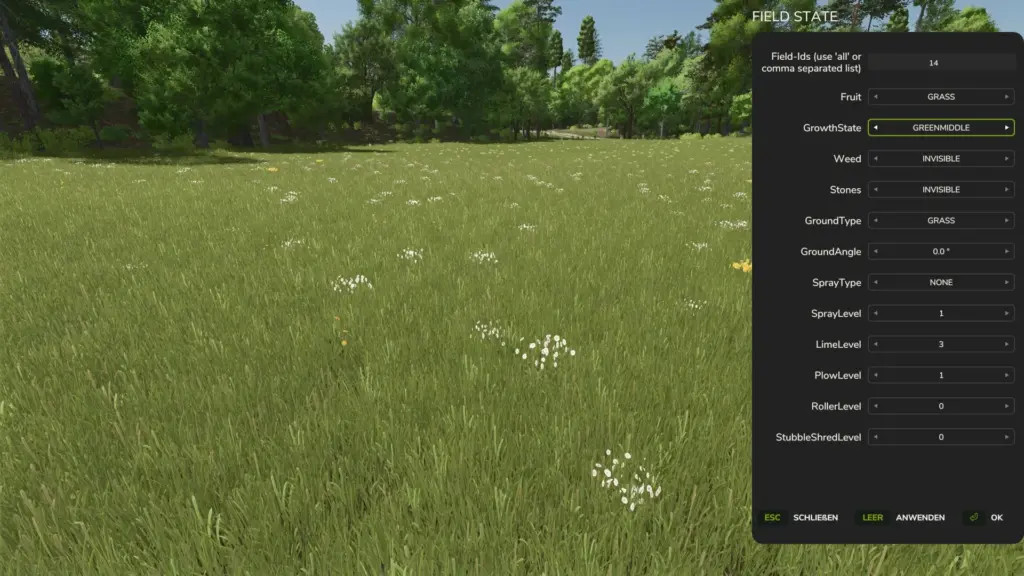
Une texture d'herbe de prairie plutôt que l'aspect classique de l'herbe des champs. Personnellement, je pense que c'est mieux pour les performances. À certains égards, l'herbe des champs du jeu sollicite beaucoup les ressources. Avec des marguerites et des pissenlits.
Après avoir décompressé et copié le dossier « grass », remplacez le dossier « grass » par le dossier « grass » nouvellement copié dans le dossier « foliage » situé dans le répertoire de votre jeu de base ou dans le dossier « mod map », s'il existe. (CRÉEZ UNE SAUVEGARDE ORIGINALE !)
Modifiez les valeurs de densité dans le fichier grass.xml si vous rencontrez des problèmes de performances. Faites-moi savoir si vous rencontrez d'autres problèmes.
Journal des modifications : +
V1.3.0.0 ajoute une version avec le nombre standard (jeu de base) de stades de croissance, ce qui devrait, je l'espère, résoudre plusieurs difficultés qui m'ont été signalées. Elle inclut également un résumé des différences et des problèmes potentiels liés aux stades de croissance supplémentaires.
V1.2.0.0 – inclut quelques conseils et instructions
V1.2.0.0 Ajout d’un remplissage d’herbe et de foin alternatif ; ajout de textures au feuillage de la pelouse et aux plans Modification de la probabilité d’apparition de l’herbe des champs et des pissenlits dans les textures meadowUS et grass
V1.0.0.2 : léger nettoyage des dossiers ; correction des chemins d’accès aux textures dans i3d pour qu’il fonctionne sur les modmaps ; légèrement ajusté la probabilité d'apparition des pissenlits et des marguerites ; ajouté un état harvestReady2 avec davantage d'herbe de champ sèche ; ajouté une texture d'herbe de champ verte fraîche dans l'état harvestReady ; et ajouté une version « prairie » de la texture avec des mauvaises herbes, de l'herbe de champ et d'autres végétaux.
Il suffit de cliquer sur « Remplacer » après avoir collé le dossier « grass » dans le dossier « foliage » de votre jeu de base. Vous pouvez également effectuer cette opération dans le dossier « modmap ». Vous devez ajouter un dossier nommé « foliage » dans le même dossier que la carte si la modmap n'en possède pas déjà un. En d'autres termes, ouvrez la carte après avoir collé le dossier « grass » et/ou « meadow » à l'aide d'un éditeur de texte dans i3d. Ensuite, utilisez Ctrl+F pour rechercher « grass » et « meadow ». Pour obtenir le XML requis, modifiez le chemin d'accès au fichier. Dans la plupart des cas, il s'agit simplement de « foliage/grass/grass.xml » et « foliage/meadowUS/meadowUS.xml ». Enregistrez le document. Vous avez terminé. Bravo ! (FAITES DES SAUVEGARDES À CHAQUE FOIS !)
Merci à M. LackofSkill
Après avoir décompressé et copié le dossier « grass », remplacez le dossier « grass » par le dossier « grass » nouvellement copié dans le dossier « foliage » situé dans le répertoire de votre jeu de base ou dans le dossier « mod map », s'il existe. (CRÉEZ UNE SAUVEGARDE ORIGINALE !)
Modifiez les valeurs de densité dans le fichier grass.xml si vous rencontrez des problèmes de performances. Faites-moi savoir si vous rencontrez d'autres problèmes.
Journal des modifications : +
V1.3.0.0 ajoute une version avec le nombre standard (jeu de base) de stades de croissance, ce qui devrait, je l'espère, résoudre plusieurs difficultés qui m'ont été signalées. Elle inclut également un résumé des différences et des problèmes potentiels liés aux stades de croissance supplémentaires.
V1.2.0.0 – inclut quelques conseils et instructions
V1.2.0.0 Ajout d’un remplissage d’herbe et de foin alternatif ; ajout de textures au feuillage de la pelouse et aux plans Modification de la probabilité d’apparition de l’herbe des champs et des pissenlits dans les textures meadowUS et grass
V1.0.0.2 : léger nettoyage des dossiers ; correction des chemins d’accès aux textures dans i3d pour qu’il fonctionne sur les modmaps ; légèrement ajusté la probabilité d'apparition des pissenlits et des marguerites ; ajouté un état harvestReady2 avec davantage d'herbe de champ sèche ; ajouté une texture d'herbe de champ verte fraîche dans l'état harvestReady ; et ajouté une version « prairie » de la texture avec des mauvaises herbes, de l'herbe de champ et d'autres végétaux.
Il suffit de cliquer sur « Remplacer » après avoir collé le dossier « grass » dans le dossier « foliage » de votre jeu de base. Vous pouvez également effectuer cette opération dans le dossier « modmap ». Vous devez ajouter un dossier nommé « foliage » dans le même dossier que la carte si la modmap n'en possède pas déjà un. En d'autres termes, ouvrez la carte après avoir collé le dossier « grass » et/ou « meadow » à l'aide d'un éditeur de texte dans i3d. Ensuite, utilisez Ctrl+F pour rechercher « grass » et « meadow ». Pour obtenir le XML requis, modifiez le chemin d'accès au fichier. Dans la plupart des cas, il s'agit simplement de « foliage/grass/grass.xml » et « foliage/meadowUS/meadowUS.xml ». Enregistrez le document. Vous avez terminé. Bravo ! (FAITES DES SAUVEGARDES À CHAQUE FOIS !)
Merci à M. LackofSkill
MeadowGrass texture instead of the normal grass texture for fields. In my humble opinion, it’s better for performance. The in-game field grass is very demanding performance-wise, somehow. With dandelions and daisies.
Unzip, copy the grass folder, and then go to the foliage folder in your base game directory or mod map (if available) and replace the “grass” folder with the new copied grass folder. (MAKE A BACKUP OF THE ORIGINAL!)
If you have performance issues, change the density values in the grass.xml. If you have other issues, please let me know.
Credits:
MrLackofSkill
Unzip, copy the grass folder, and then go to the foliage folder in your base game directory or mod map (if available) and replace the “grass” folder with the new copied grass folder. (MAKE A BACKUP OF THE ORIGINAL!)
If you have performance issues, change the density values in the grass.xml. If you have other issues, please let me know.
Credits:
MrLackofSkill
Télécharger les fichiers de la dernière version
Version: v 1.3Mise à jour de: il y a 9 mois
Taille totale: 320.42 MB FS25_meadowGrass_PREFAB_13_UNPACK_fs25planet.zip direct télécharger · 320.42 MB · ajouté il y a 9 mois
Vous pourriez également aimer »

_fs25planet.webp)


0 Commentaires
Il n'y a pas de commentaires. Soyez le premier à commenter !