Team Sync Tool V Beta

0/5,
0
Stimmen
Cloud Save with the FS25 Team Sync Tool & Mod Sync Automation (Requires Google Drive)
Your whole Farming Simulator 25 team can easily share savegames, modifications, and team responsibilities with FS25 Team Sync, a stand-alone Windows application that syncs seamlessly with Google Drive Desktop.
This application eliminates the hassles of manual copying, compressing, restoring, and mod-sharing, making it ideal for multiplayer groups, roleplay servers, and team farms.
✅ Principal Features
Automatic Uploading of Saves
transfers your local savegame1 folder to a shared Google Drive after zipping it.
One-Click Restore and Save
You may quickly restore any team save to your FS25 savegame by downloading it.
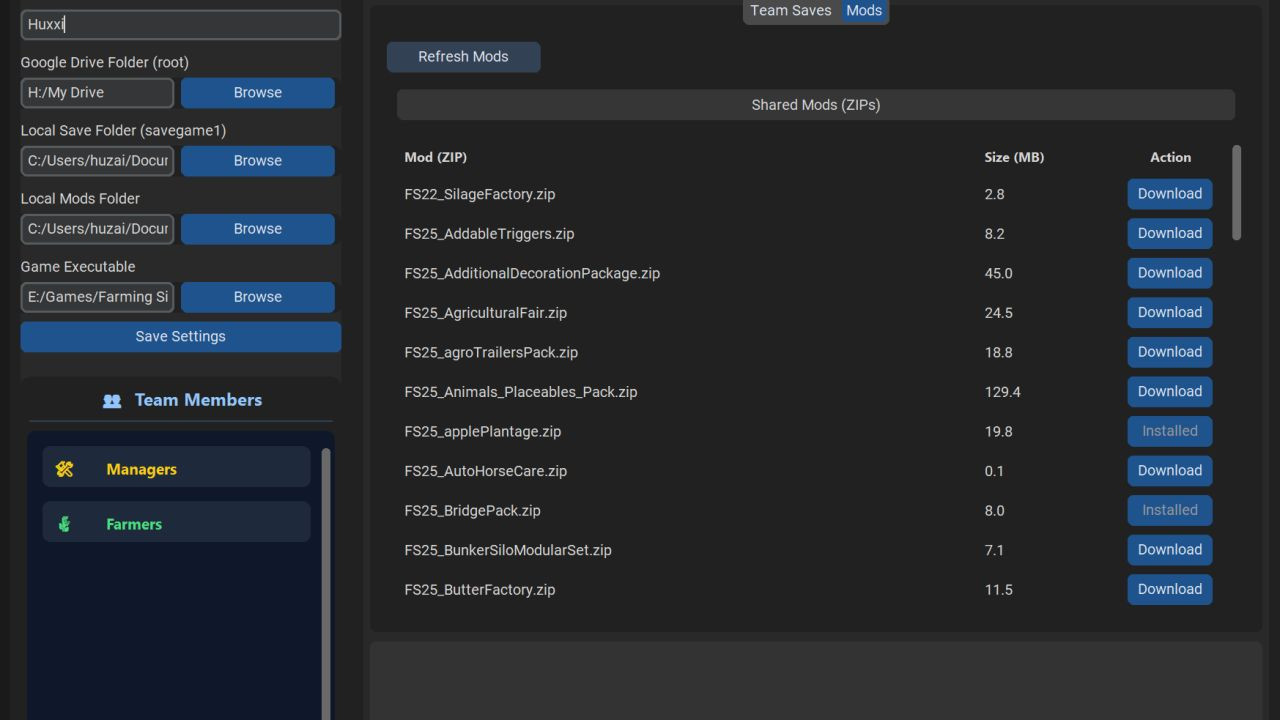
All shared modifications in Google Drive are listed in the Shared Mod Folder, which you may install into your local mods folder with a single click.
– Team Management View shows Managers & Farmers inside the app after reading team.json.
The "Play" button
Open FS25 straight from inside the application.
Live Status Indicators
indicates if the game is running and whether Google Drive is connected.
Asynchronous Background Tasks
There is no freezing; all zipping, unzipping, uploading, and downloading takes place in background threads.
Requirements
Each member of the squad has to have these:
Google Drive on a desktop (necessary)
To guarantee that everyone sees the same shared folder quickly, all team members must enter into Google Drive using the SAME Google account.
Essential 📁 Structure of Google Drive
After signing in, make the following folder structure within Google Drive:
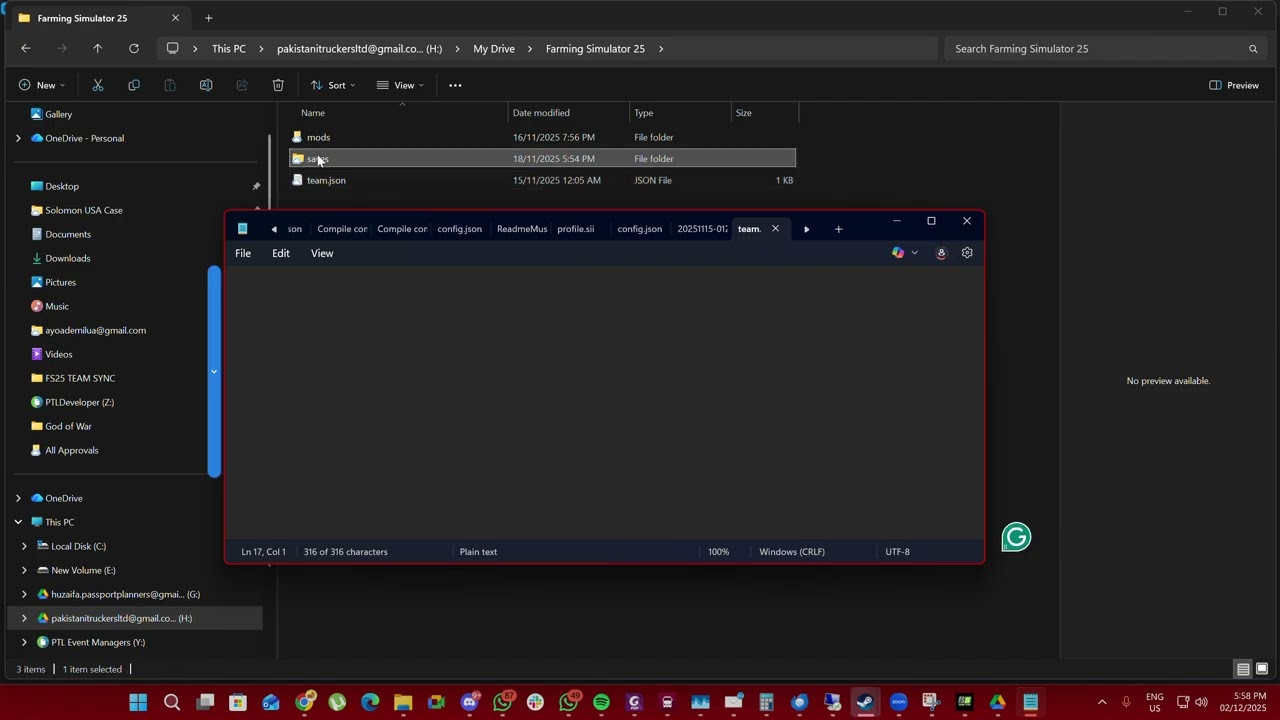
Farming Simulator 25/Google Drive/└── mods/← Shared modifications (ZIP files) ├── saves/← Team save ZIPs uploaded by the application
Team.json ■ Team configuration (Farmers & Managers) Example team.json
{ managers: [{name: "Huxxi," {name: "Ali," {name: "Huxxi," {, "farmers";: [{"“name";: “Omar";}, {"“name";: “Zaid";}]
{
How to Utilize
🔧 1. Install Google Drive for Desktop and log in using your team's Google account. 📂 2. Launch the Team Sync Tool for FS25.
Set up the following on the first launch:
FS25 executable path
The root folder of Google Drive
The FS25 shared folder is automatically detected by the program when you choose your Google Drive directory.
✆️ Uploading a Team Save: Select the Team Saves tab, click Upload Team Save, and provide a brief changelog (if necessary).
It will be immediately visible to other users when the program zips your save folder and uploads it to Google Drive → saves.
✇️ Restoring a Team Save: Go to Team Saves, click Download next to the desired save, and it will restore over your savegame1 (auto-wipe → auto-extract).
📦 Installing Shared modifications: Open the Mods tab; click Download next to any shared mod; the program uploads the mod ZIP into your local FS25 modifications folder; if it is already installed, the → button displays Installed. 🧑🌾 Overview of the Team
After reading team.json from the shared folder, the tool shows:
Superb for role-playing or team-structured farms: Managers (highlighted) Farmers 🟢 Why Make Use of This Tool?
No more "which mods do we need?" and no more transmitting saves on WhatsApp.
The save and modifications are always the same for everyone, and there are no more corrupted manual copies.
Thanks to Huxi619
Your whole Farming Simulator 25 team can easily share savegames, modifications, and team responsibilities with FS25 Team Sync, a stand-alone Windows application that syncs seamlessly with Google Drive Desktop.
This application eliminates the hassles of manual copying, compressing, restoring, and mod-sharing, making it ideal for multiplayer groups, roleplay servers, and team farms.
✅ Principal Features
Automatic Uploading of Saves
transfers your local savegame1 folder to a shared Google Drive after zipping it.
One-Click Restore and Save
You may quickly restore any team save to your FS25 savegame by downloading it.
All shared modifications in Google Drive are listed in the Shared Mod Folder, which you may install into your local mods folder with a single click.
– Team Management View shows Managers & Farmers inside the app after reading team.json.
The "Play" button
Open FS25 straight from inside the application.
Live Status Indicators
indicates if the game is running and whether Google Drive is connected.
Asynchronous Background Tasks
There is no freezing; all zipping, unzipping, uploading, and downloading takes place in background threads.
Requirements
Each member of the squad has to have these:
Google Drive on a desktop (necessary)
To guarantee that everyone sees the same shared folder quickly, all team members must enter into Google Drive using the SAME Google account.
Essential 📁 Structure of Google Drive
After signing in, make the following folder structure within Google Drive:
Farming Simulator 25/Google Drive/└── mods/← Shared modifications (ZIP files) ├── saves/← Team save ZIPs uploaded by the application
Team.json ■ Team configuration (Farmers & Managers) Example team.json
{ managers: [{name: "Huxxi," {name: "Ali," {name: "Huxxi," {, "farmers";: [{"“name";: “Omar";}, {"“name";: “Zaid";}]
{
How to Utilize
🔧 1. Install Google Drive for Desktop and log in using your team's Google account. 📂 2. Launch the Team Sync Tool for FS25.
Set up the following on the first launch:
FS25 executable path
The root folder of Google Drive
The FS25 shared folder is automatically detected by the program when you choose your Google Drive directory.
✆️ Uploading a Team Save: Select the Team Saves tab, click Upload Team Save, and provide a brief changelog (if necessary).
It will be immediately visible to other users when the program zips your save folder and uploads it to Google Drive → saves.
✇️ Restoring a Team Save: Go to Team Saves, click Download next to the desired save, and it will restore over your savegame1 (auto-wipe → auto-extract).
📦 Installing Shared modifications: Open the Mods tab; click Download next to any shared mod; the program uploads the mod ZIP into your local FS25 modifications folder; if it is already installed, the → button displays Installed. 🧑🌾 Overview of the Team
After reading team.json from the shared folder, the tool shows:
Superb for role-playing or team-structured farms: Managers (highlighted) Farmers 🟢 Why Make Use of This Tool?
No more "which mods do we need?" and no more transmitting saves on WhatsApp.
The save and modifications are always the same for everyone, and there are no more corrupted manual copies.
Thanks to Huxi619
Videos
Dateien der neuesten Version herunterladen
Version:Aktualisiert: vor 10 Monaten
Gesamtgröße: 25.59 MB fs25teamsync_fs25planet.rar direct herunterladen · 25.59 MB · hinzugefügt. vor 10 Monaten
Sie könnten auch mögen »



_fs25planet.jpg)


0 Kommentare
Es sind noch keine Kommentare vorhanden. Seien Sie der Erste, der kommentiert!