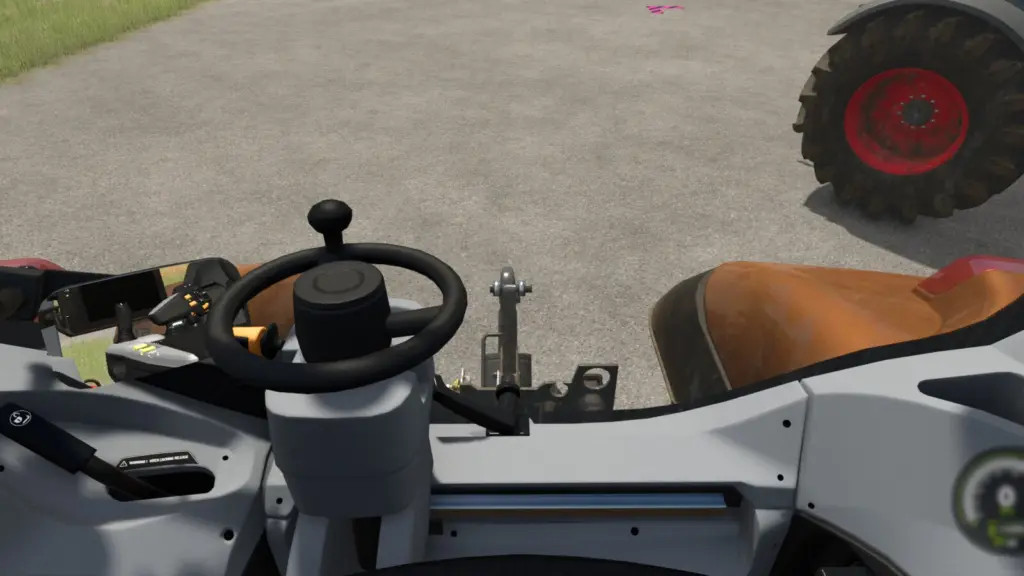
Indoor Camera Position v 1.0

0/5,
0
Stimmen
Allows the player to change the position of the indoor vehicle camera.
The mouse wheel changes the position up and down.
Hold the Left Shift key while using the mouse wheel to move the camera forward and backwards.
Hold the Left Ctrl key while using the mouse wheel to move the camera left and right.
To reset to center easily:
Press the middle mouse button (press on the mouse wheel) to reset the up and down position.
Hold the Left Shift key and press the middle mouse button to reset the forward and backward position.
Hold the Left Ctrl key and press the middle mouse button to reset the left and right position.
Credits:
ViperGTS96
The mouse wheel changes the position up and down.
Hold the Left Shift key while using the mouse wheel to move the camera forward and backwards.
Hold the Left Ctrl key while using the mouse wheel to move the camera left and right.
To reset to center easily:
Press the middle mouse button (press on the mouse wheel) to reset the up and down position.
Hold the Left Shift key and press the middle mouse button to reset the forward and backward position.
Hold the Left Ctrl key and press the middle mouse button to reset the left and right position.
Credits:
ViperGTS96
Dateien der neuesten Version herunterladen
Version: v 1.0Aktualisiert: vor 1 Jahr
Gesamtgröße: 90.53 KB
FS25_indoorCamPosition_fs25planet.zip
direct herunterladen
· 90.53 KB
· hinzugefügt. vor 1 Jahr
Diese Datei wird von Antivirus gescannt und ist sicher.
Mehr Details
Über Mod
| Neueste Version | v 1.0 |
| Spiel | FS25 |
| Kategorie | Werkzeuge |
| Downloads | 299 |
| Erstellt | vor 1 Jahr |
| Letzter Virenscan |
0/98
Mehr Details |
Sie könnten auch mögen »


_fs25planet.webp)

0 Kommentare
Es sind noch keine Kommentare vorhanden. Seien Sie der Erste, der kommentiert!